ccode
A downloadable tool for Windows, macOS, and Linux
It reads configuration from YAML files for all of the providers you configure, it sets the required environment variables, and launches Claude Code. This means that it lets you use DeepSeek, OpenRouter, and other providers with a single flag. Optionally, there are shorthands for permissions and Remote Control sessions.
You may view more information on the tool's homepage, but below is a summary.
Disclaimer: ccode is not affiliated with or endorsed by Anthropic. You still need a regular Claude Code install.
What does it look like?
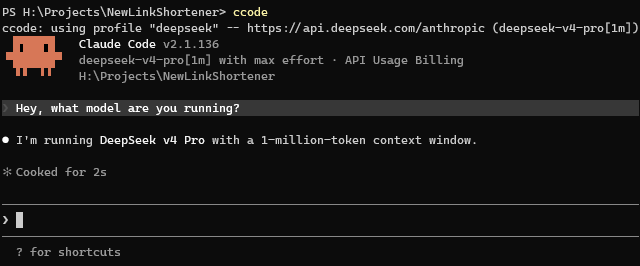
It adds the ccode command to your shell, that lets you manage multiple profiles.
Here’s a quick example of me running with the DeepSeek profile as my default:
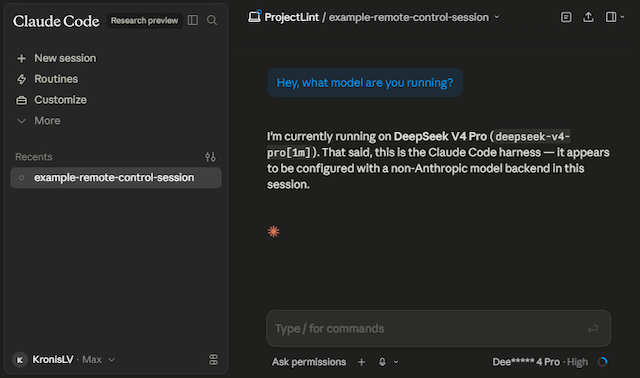
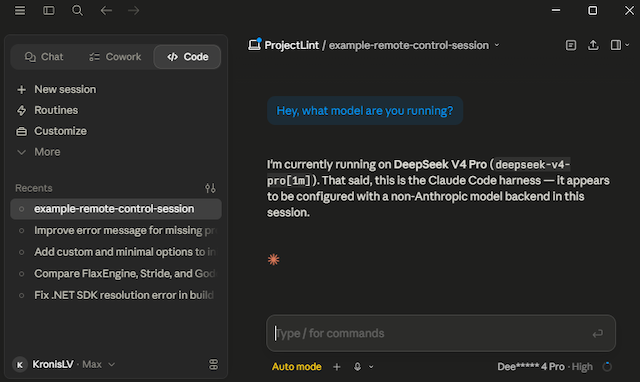
I can even use the --control option to enable Remote Control and see a third party provider driven session in the web or desktop apps:
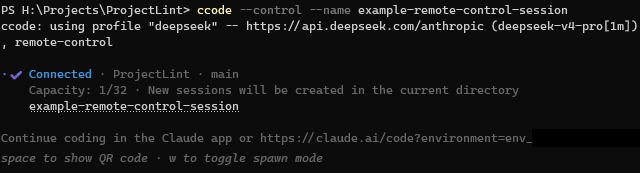
Update: Anthropic broke Remote Control with third-party providers in Claude Code 2.1.139+, it fails to start whenANTHROPIC_API_KEYorANTHROPIC_AUTH_TOKENis set in the environment. ccode 2.0.0 adds a Local proxy to keep this working, that docs page has more info.
Note: As of 3.0.0 the proxy can also switch backends at runtime. With ccode --dynamic, you can flip which provider is running a session without restarting it - see the Dynamic proxy page.
Here’s that session visible in the web app (apparently experimental):
Here’s that session visible in the desktop app (did you even know they have that?):
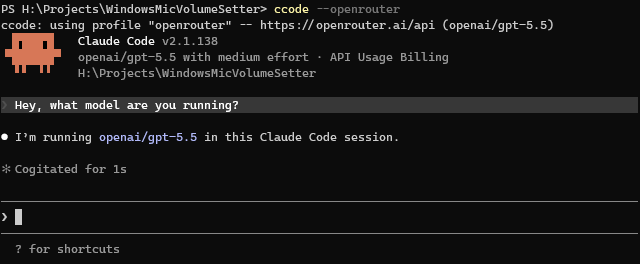
You can even use something like OpenRouter to use models that normally don’t really talk the Anthropic API, like OpenAI models, try out how well Mistral models work with Claude Code etc.:
Note that all of the functionality above is already supported by Claude Code and is NOT something I wrote myself. Instead, I wrote the launcher to make accessing it easier, I think EVERYONE should have easy access to that.
I will still probably have an Anthropic subscription, but downgrade mine from Max to Pro. I still think that Anthropic has some of the best models for development out there, it’s just that I don’t have a lot of money. With this tool, I can easily use whatever models I prefer, many of which are more affordable (technically even local ones).
Where do you get it?
The tool is offered under a pay-what-you-want model, right here on Itch.io, on this page, the suggested price is 7 USD and the minimum is 0 USD.
The tool is also offered as source-available, you can compile it yourself on your own devices.
How do you set it up?
You can use the program portably, but most folks will want to make it available in their PATH.
Commands are provided for this, to put it in the user/system directory and make it easy to invoke.
Windows:
# Install the program to use it from the terminal (restart terminal after)
# There might be a SmartScreen warning the first time you run this executable
# In PowerShell:
.\ccode.exe install
# Or in cmd:
ccode.exe install
Linux:
# Install the program to use it from the terminal (restart terminal after)
chmod +x ./ccode
./ccode install
Mac:
# Install the program to use it from the terminal (restart terminal after)
# Use the .pkg installer for a one-click install,
# or the universal ZIP and ccode install:
chmod +x ./ccode
./ccode install
Configuration management is the same across all platforms (the file paths differ though, of course):
# Create the config file with examples
ccode init-config
# Edit the configuration file to fill in the providers you want to use
ccode edit-config
For example, if you wanted to use DeepSeek, you’d just grab an API key at: DeepSeek Platform - API keys
They also have a Claude Code specific page with instructions, we include examples: Integrate with Claude Code
Uncomment the examples we’ve prepared and fill out your API keys, you can also change the models:
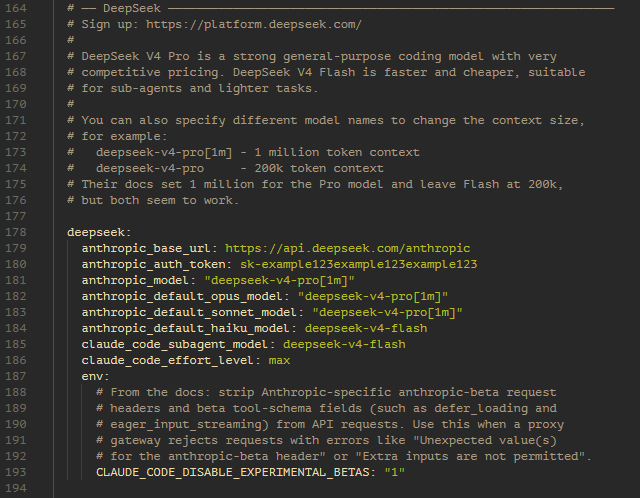
If you always want to use DeepSeek, you can also change it to be the default profile, alongside customizing any other goodies you want:
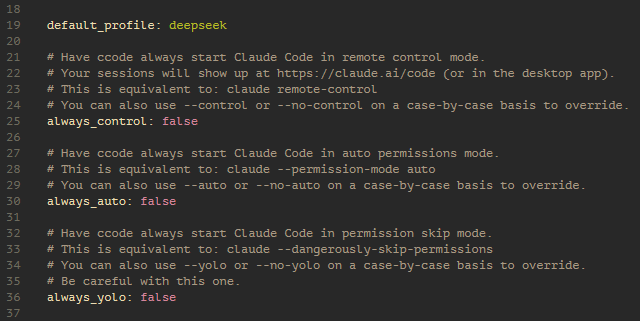
Once all of that is done, here’s the normal usage you’d use day to day:
# Launch with default profile
ccode

# Launch with a specific profile
ccode --deepseek

# Can also launch with custom permissions or Remote Control
ccode --deepseek --auto
ccode --deepseek --control

# There's also help if you need it, explaining the current config too
ccode --help
# It does override the claude default, however that help is available directly
claude --help
See the Usage page for all the details, including profile selection, permissions, and more.
As a quick example, you could have project A where you use your Anthropic subscription (in ./ccode.yaml inside the project directory):
default_profile: default
Then for project B you might use a work-issued Anthropic API key:
default_profile: anthropic
And for some other projects you could use DeepSeek by default:
default_profile: deepseek
Those are just the example profile names from the global config file (ccode edit-config), you can have as many different ones as you want, for any of the supported providers, even local models.
You can also override profile fields (like which DeepSeek model is used) or environment variables per-project, while keeping API keys in your user config so they don’t end up committed. See the Usage page for more details.
To scaffold one of these project configs, cd into the project directory and run:
ccode init-config --minimal .
ccode edit-config .
You can read through the config file in more detail to see how to disable the Anthropic telemetry (this app doesn’t have any telemetry of its own btw).
Note: since 1.3.0 you can also use Importing configuration in case you or your company decide to host/distribute the profile files somewhere.
See the Providers page for more setup details and some of the providers that you can use.
How does it work?
This program is a wrapper around Claude Code, that allows setting the model and API related variables to use a variety of providers, then just launches the executable.
You could get something similar with a bunch of shell scripts, but it’s easier to distribute a single binary that also lets you parse config files and work across different OSes and environments.
For more details, see the Frequently Asked Questions page.
Download
Click download now to get access to the following files:
Development log
- Version 4.0.0 is out - per-slot model routing is now supported62 days ago
- Version 3.1.0 is out - we have dynamic model switching70 days ago
- Version 2.0.0 is out - fixing Remote Control with 3rd party providers80 days ago
- I think Anthropic broke Remote Control with 3rd party providers86 days ago
- Version 1.5.0 is out - a bunch of changes88 days ago
- Version 1.1.0 is out, some quick post-release patches90 days ago
- Hello, world!91 days ago